Resources
A Resource configures an application or service in AIGW. Its kind selects delegated merchant access or application sign-in.
Token exchange Resources have Resource-specific discovery and authorization URLs, plus signing keys for merchant-facing assertions. OAuth client Resources provide the shared core authorization and discovery URLs for application sign-in. AIGW OAuth tokens use the shared core issuer.
Choose the Resource kind
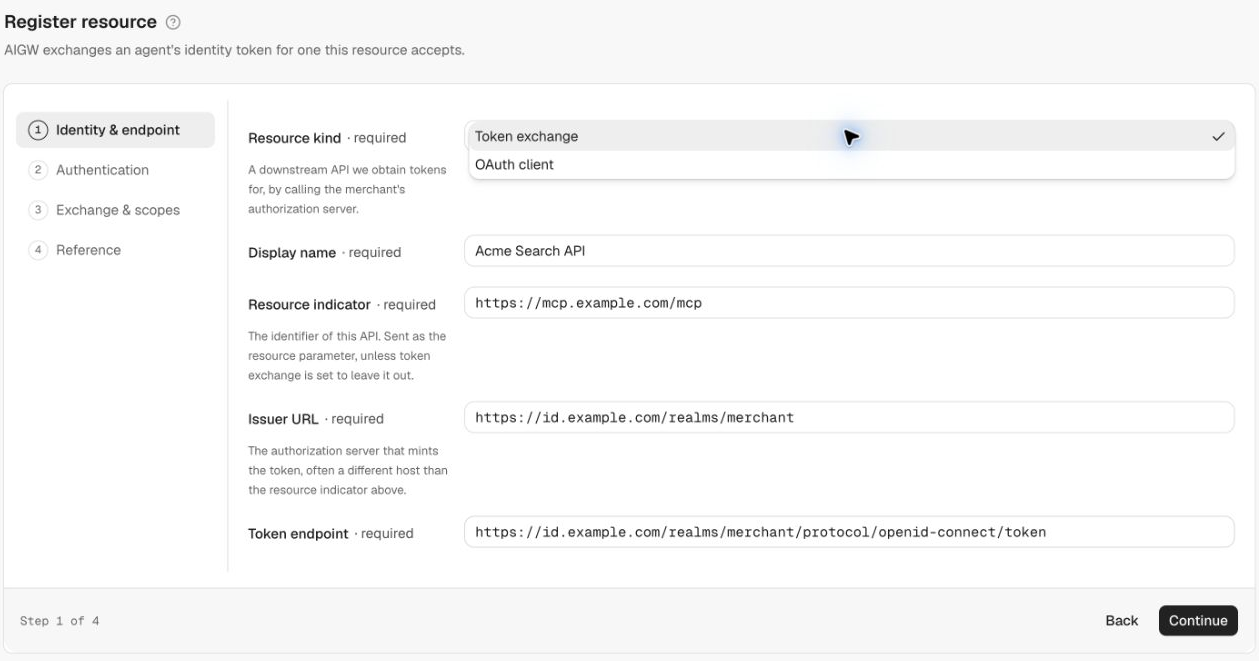
| Resource kind | Primary scenario | AIGW's role | Typical developer |
|---|---|---|---|
| Token exchange | Agent acts through MCP/UCP on behalf of a user and ultimately needs access to a merchant API | AIGW handles user/agent authorization and obtains/manages a merchant access token accepted by the merchant's Authorization Server/API | MCP/UCP provider or merchant building an agent-facing service |
| OAuth client | Traditional human sign-in to an application | AIGW acts as the application's IdP/authorization service and gives the application OAuth/OIDC client configuration | Web/mobile application developer |
Building an MCP/UCP for agent access? → Token exchange
Adding human sign-in where AIGW is the IdP? → OAuth client
Token exchange Resource
Use Token exchange when the downstream merchant API has its own authorization system and the MCP/UCP service needs a merchant credential representing the authorized user.
Conceptually:
- which merchant Resource is being requested;
- which merchant Authorization Server/token endpoint to use;
- which client identity AIGW uses there;
- which authentication/grant mechanism to use;
- which scopes/permissions are relevant;
- which AIGW identity providers may authenticate the human user.
Wizard steps
| Step | Fields |
|---|---|
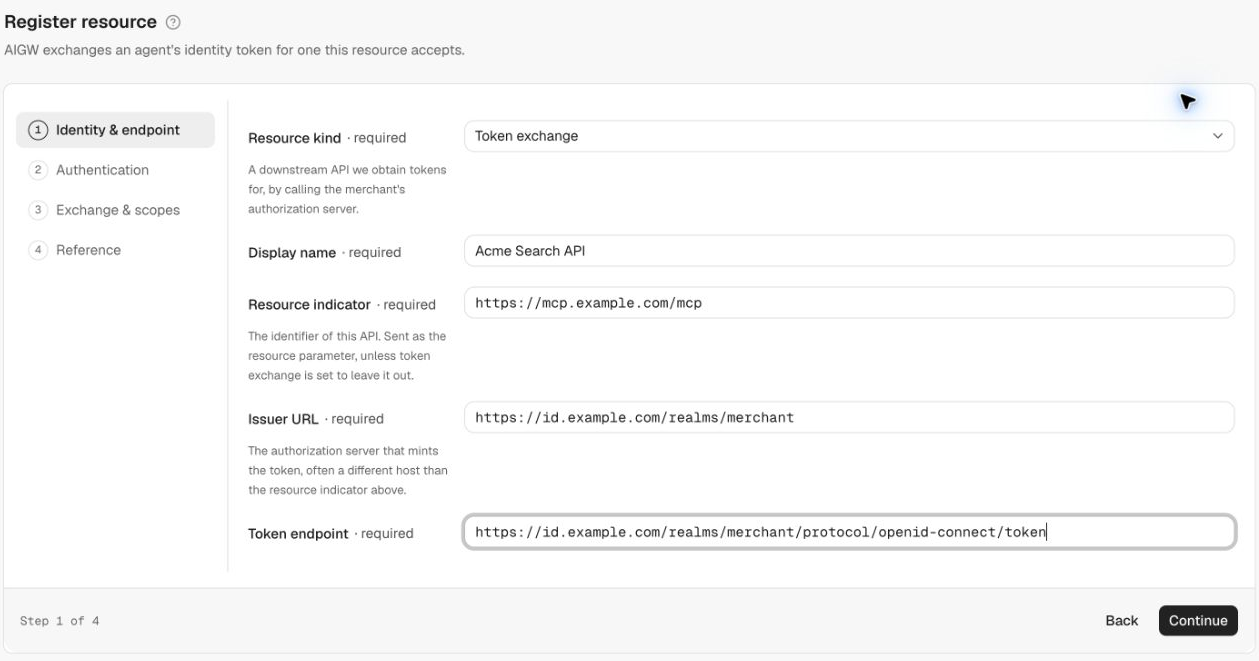
| 1. Identity & endpoint | Resource kind, Display name, Resource indicator, Issuer URL, Token endpoint |
| 2. Authentication | Client ID, Client authentication (private_key_jwt, client_secret_basic — Coming soon for merchant-token provisioning — or token_exchange). For token_exchange: optional Client secret and expandable Exchange request settings |
| 3. Exchange & scopes | Identity providers (optional), Requested scopes (scope value, display name, display description) |
| 4. Reference | Values to hand to the merchant IAM team and the agent developer |
Important inputs
| Input | Source | Purpose |
|---|---|---|
| Resource indicator | MCP operator, agreed with merchant IAM | Canonical MCP endpoint used for AIGW access token audience and credential redemption, e.g. https://mcp.example.com/mcp. The merchant API URL and merchant access token audience are separate |
| Merchant issuer URL | Merchant OAuth/OIDC metadata | Identifies the merchant Authorization Server (often a different host than the Resource indicator) |
| Merchant token endpoint | Merchant OAuth/OIDC metadata | Endpoint AIGW calls to obtain/exchange the downstream credential |
| Client ID | Merchant IAM client registration | Identifies AIGW to the merchant AS |
| Client authentication | Agreed with merchant IAM | Determines how AIGW authenticates and represents the user |
| Scopes | Merchant API/IAM | Defines requested downstream permissions |
For token_exchange, configure Send resource indicator, Send requested token type, Audience, and Subject token type under Exchange request. See Token exchange request settings for defaults and parameter meanings.
Reference outputs
The Reference step (and the bottom of the Resource's Configuration tab) groups outputs by audience:
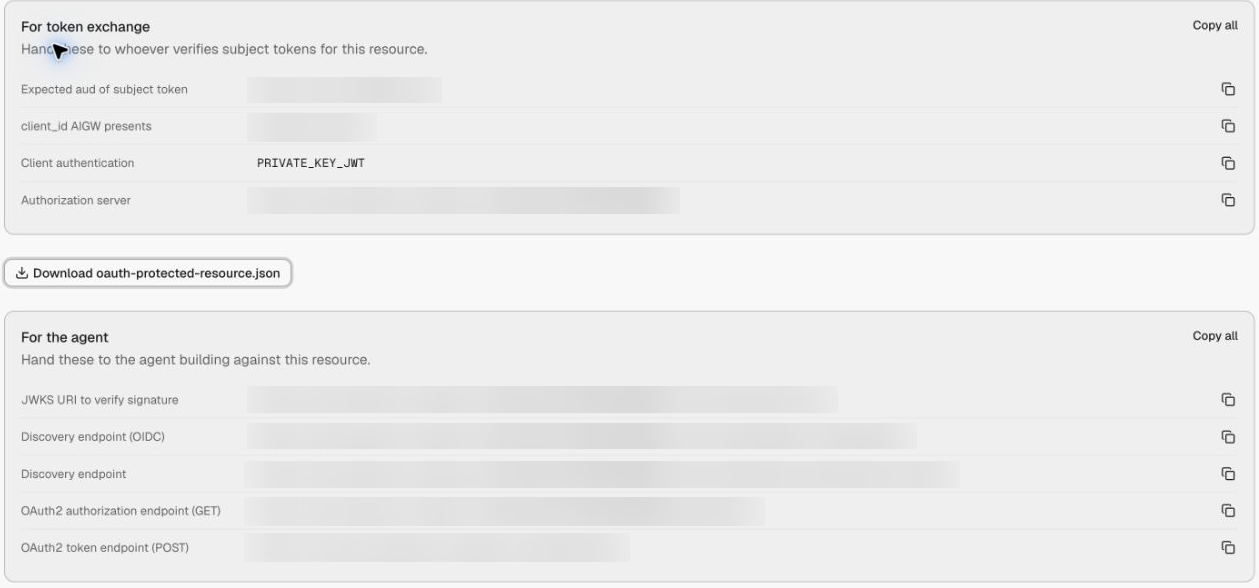
| Consumer | Value | Purpose |
|---|---|---|
| Merchant authorization server | Expected aud of subject token | Merchant Issuer URL, e.g. https://id.example.com/realms/merchant |
| Merchant authorization server | Resource issuer and /<RESOURCE_ID>/.well-known/jwks.json | Verify AIGW user assertions; the same Resource key verifies client assertions |
| Merchant authorization server | Client ID and client authentication | Match its aigw-search registration and grant settings |
| Agent | Resource discovery and authorization endpoints | Register and start user authorization |
| Agent and MCP service | issuer and jwks_uri returned by discovery | Validate core-issued AIGW tokens |
| MCP service | Protected Resource Metadata download | Advertise the MCP Resource indicator and AIGW authorization server |
For AIGW access tokens, use discovery's core jwks_uri. A URL ending in /<RESOURCE_ID>/.well-known/jwks.json contains merchant-facing assertion keys, including when displayed under For the agent in the Reference screen.
Each section has Copy all and per-value copy buttons.
See Configure AIGW for field-by-field setup and supported authentication methods.
OAuth client Resource
Use OAuth client when a conventional application wants to authenticate a human through AIGW. In this model, AIGW is the IdP/authorization service for the application rather than a bridge to a merchant Authorization Server.
Conceptually:
Wizard steps
| Step | Fields |
|---|---|
| 1. Identity & endpoint | Resource kind, Display name |
| 2. Client configuration | Redirect URIs (one or more), Token endpoint auth method, Allowed scopes |
| 3. Identity providers | Optional selection of Account-enabled IdPs |
| 4. Reference | Client secret (shown once) and the values for the application |
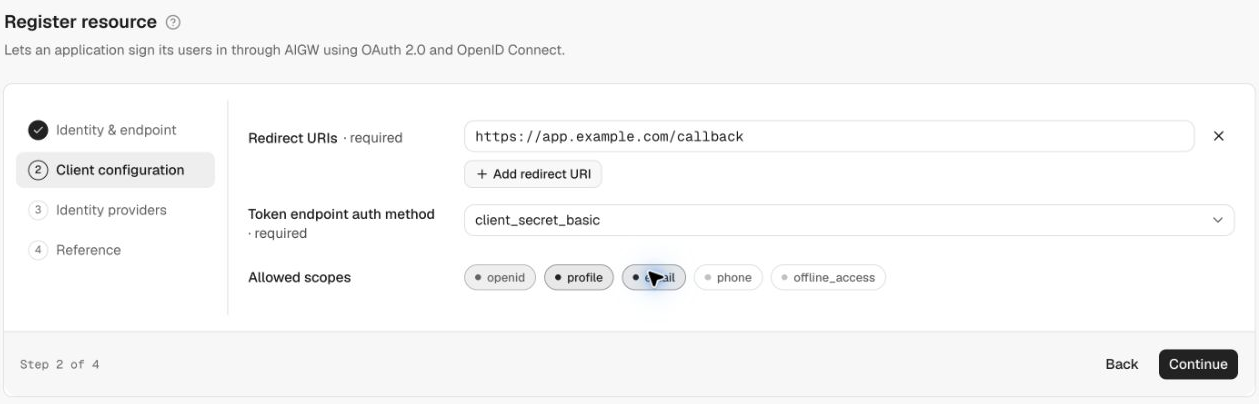
| Input/choice | What it means | Where it comes from / how to use it |
|---|---|---|
| Redirect URIs | Application callbacks allowed to receive the authorization response | Your application; register each exact callback URL (Add redirect URI for more than one) |
| Token endpoint auth method | How the application authenticates when calling the token endpoint: client_secret_basic, client_secret_post, or none (PKCE) | Use none (PKCE) for public clients (SPA/mobile) and a secret-based method for confidential server-side clients. Shown read-only after creation |
| Allowed scopes | Identity information/permissions the application may request: openid, profile, email, phone, offline_access | Choose the scopes the application needs (openid is selected by default) |
| Identity providers | Ways the human may authenticate through AIGW | Select AIGW IdPs appropriate for the application |
The Reference step returns the OAuth client information and AIGW endpoints the application needs.
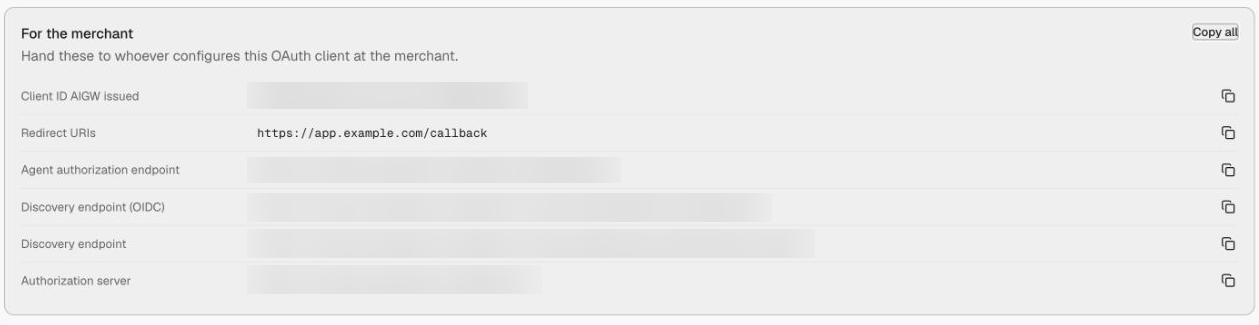
Outputs
| AIGW output | What it is | How the application uses it |
|---|---|---|
| Client secret, when applicable | OAuth client credential — shown once and can't be retrieved again | Store server-side immediately and use only with the configured client-authentication method |
| Client ID AIGW issued | OAuth client identifier | Sent in authorization/token requests |
| Redirect URIs | Echo of the registered callbacks | Confirm they match the application |
| Agent authorization endpoint | https://core.api.aigw.loginid.ai/oauth2/auth | Start application sign-in |
| Discovery endpoint (OIDC) / Discovery endpoint | Core .well-known/openid-configuration and .well-known/oauth-authorization-server URLs | Discover the issuer, token endpoint, JWKS, and supported protocol features |
| Authorization server | https://core.api.aigw.loginid.ai/ | Configure the application's OIDC issuer; validate ID tokens against the exact issuer returned by discovery |
Resource list
Project → Resources lists each Resource with its kind badge, status (Active), and a summary: the token endpoint and client authentication for Token exchange Resources, or the client ID, redirect URIs, and auth method for OAuth client Resources.
Resource settings after creation
A Token exchange Resource detail page has four tabs:
- Configuration — editable identity, endpoint, client, identity-provider, and scope settings, followed by the Reference values and a Danger zone with Delete resource;
- Signing keys — ES256 signing keys/JWKS used for Resource assertions (see Signing keys);
- Sign-in & consent — user-facing branding/consent behavior (see Identity providers);
- Events — outcomes associated with this Resource, including exchange activity.
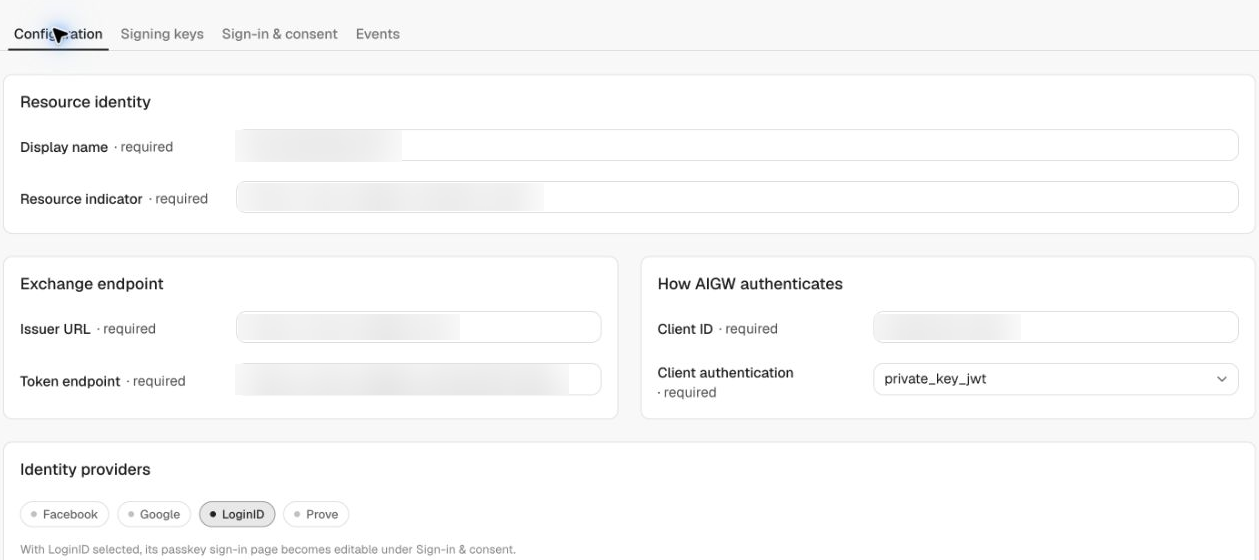
Before using the Resource:
- Click Create resource on wizard step 3 to create the Resource and its signing key; step 4 displays Reference values. If key creation fails, open Resource → Signing keys → New Signing Key. Confirm an Active key before configuring merchant trust. When using DevCLI (the
aigwcommand-line tool), create and verify a signing key. - Active is derived from complete saved configuration; it is not a successful health check.
- Verify exchange through user authorization and credential redemption; an Active badge alone does not establish success.
- Standalone
CLIENT_SECRET_BASICsupport for merchant-token provisioning is Coming soon. UsePRIVATE_KEY_JWTorTOKEN_EXCHANGE. - Expected aud of subject token is the configured merchant Issuer URL. The Resource JWKS verifies merchant-facing assertions; AIGW access tokens require discovery's core JWKS.
- Deleting a Resource is permanent: agents using it can no longer exchange tokens for it.