Agent policy
Agent policy decides what status an agent gets the first time it asks for one of a Project's Resources: Approved, Pending (held for a person to decide), or Rejected. It lives under Project → Agents → Agent policy and has four tabs: How it works, Domain rules, Approval rules, and KYA issuers.
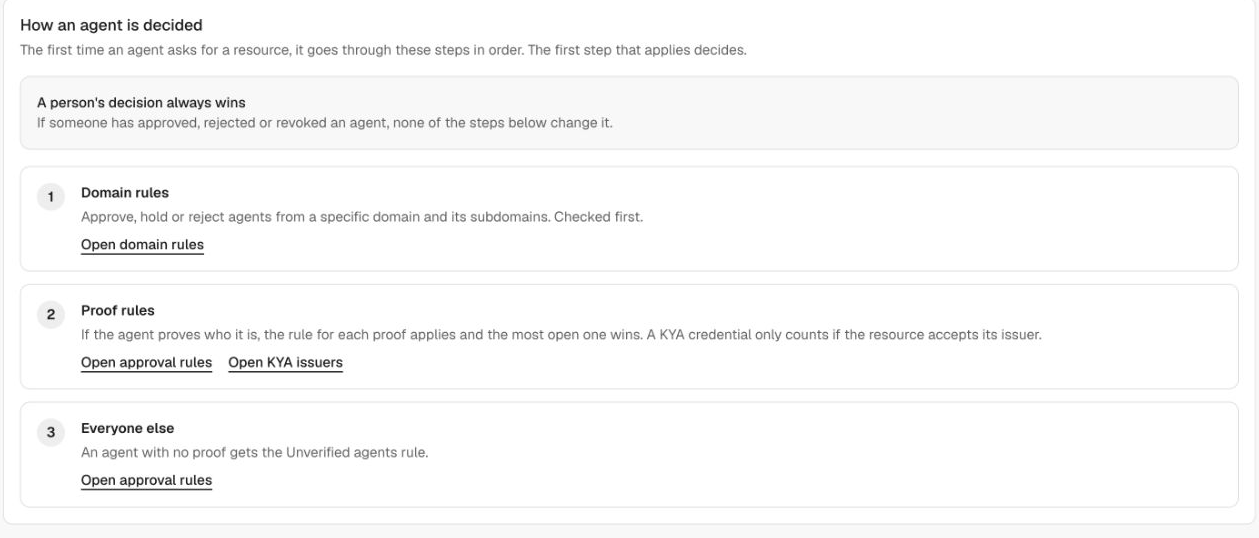
Without a configured Agent policy, every agent is approved when it first requests a Resource. To require review, set Unverified agents and the proof rules to Hold before accepting agent requests. Review domain rules and any Resource-specific overrides as well. Agent approval does not replace user authorization or scope checks.
How AIGW evaluates agent access
The first time an agent asks for a Resource, AIGW evaluates these steps in order. The first step that applies decides the outcome.
| Order | Step | What it checks |
|---|---|---|
| — | Manual decisions take precedence | If someone has approved, rejected, or revoked the agent in the Console, none of the steps below change it. |
| 1 | Domain rules | Approve, hold, or reject agents from a specific domain and its subdomains. Checked first. |
| 2 | Proof rules | If the agent proves who it is, the rule for each proof applies and the least restrictive outcome wins: Approve, then Hold, then Reject. A KYA credential only counts if the Resource accepts its issuer. |
| 3 | Everyone else | An agent with no proof gets the Unverified agents rule. |
Which settings apply
- A Resource's own rules replace the Project's rules. A Resource without its own rules follows the Project; a Project without rules uses the system default (approve everyone).
- For domain rules, a Resource's rule beats any Project rule, and the most specific domain wins (
mail.example.comoverexample.com).
When a change takes effect
- Changing approval rules affects agents the first time they ask. Agents that were already decided keep their status.
- A domain rule set to Reject also cuts off matching agents that were approved or held automatically, on their next Resource authorization request. A person's decision still stands.
- AIGW re-evaluates an automatic decision that depended on a withdrawn KYA credential.
- These policy changes are not a blanket immediate revocation of every issued token or downstream session.
Console and DevCLI values
DevCLI is the aigw command-line tool. Use the following values when configuring a policy from your terminal or the management API.
| Console rule | DevCLI / API value | Resulting agent status |
|---|---|---|
| Approve | APPROVE | Approved |
| Hold | PENDING | Pending; an operator must approve or reject the agent |
| Reject | REJECT | Rejected |
Approval rules
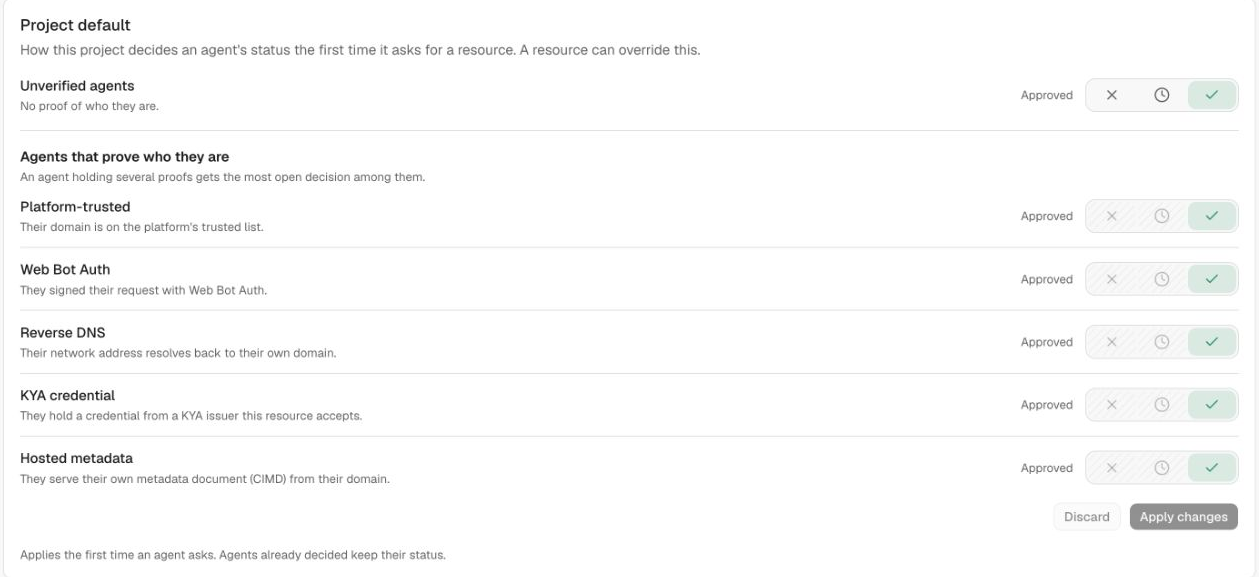
Approval rules set the Project default and optional per-Resource overrides. Each row offers three outcomes: Reject (✕), Hold (clock — the agent goes to Pending), or Approve (✓). Click Apply changes to save, or Discard to cancel.
| Rule | Applies to |
|---|---|
| Unverified agents | Agents with no proof of who they are. |
| Platform-trusted | Agents whose domain is on the platform's trusted list. |
| Web Bot Auth | Agents that signed their request with Web Bot Auth. |
| Reverse DNS | Agents whose network address resolves back to their own domain. |
| KYA credential | Agents holding a credential from a KYA issuer the Resource accepts. |
| Hosted metadata | Agents that serve their own client metadata document (CIMD) from their domain. |
An agent holding several proofs gets the least restrictive decision among them: Approve before Hold before Reject. Reset to system default removes the Project's own rules.
The Resources table on the same page shows the status each Resource gives a new agent and whether it Inherits project rules. Use Edit rules on a Resource to give it its own policy — changing any rule there stops that Resource from following the Project. Bulk edit applies changes to several Resources at once.
KYA issuers
KYA issuers is the whitelist of Know-Your-Agent credential issuers whose credentials can vouch for an agent. The approval rules use it when evaluating the KYA credential proof.
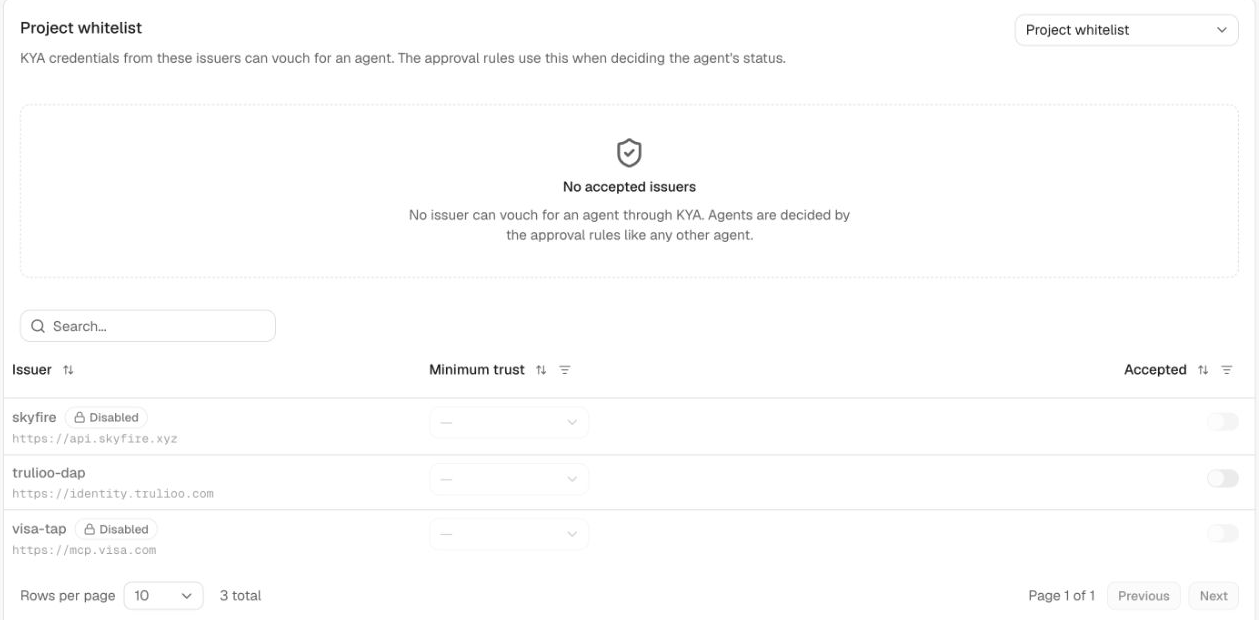
The selector at the top switches between the Project whitelist and Resource-specific whitelists (Resources either inherit the Project whitelist or have their own). For each issuer you can turn acceptance on and choose a minimum trust level:
| Trust level | Meaning |
|---|---|
| Trusted | Strongest level. Fully verified and bound to the presenting client. |
| Known | Verified and bound, one step below Trusted. Applied as the minimum when none is set. |
| Declared | A reference only. Proof arrives later, with a signed request. |
| Unbound | Verified, but could not be tied to the client presenting it. |
| Untrusted | Weakest level. No verification is established. |
Select from the KYA issuers available to your Account. If no issuer is accepted, AIGW evaluates agents using the other applicable approval rules.
Domain rules
Open Project → Agents → Domain rules to define Project rules or Resource-specific rules for a domain and its subdomains. Resource rules take precedence over Project rules; more specific domains take precedence within the applicable level.
An Approve rule requires accepted proof of control of the matching domain; merely declaring a callback under that domain is insufficient. You can restrict which proof methods satisfy the rule. Hold and Reject can match the claimed domain without that approval proof. A matching approve rule without the required evidence does not automatically grant access; fallback/proof rules can still decide.
Related
- Agents — the Pending / Approved / Rejected / Revoked lists and manual decisions.
- Register with AIGW — how agents get registered in the first place.