Keycloak
Enable the JWT Authorization Grant identity-provider and client settings in Keycloak. Configure AIGW with private_key_jwt: an RFC 7523 JWT bearer authorization grant for the user assertion plus JWT client authentication for the AIGW client.
Prerequisite: Keycloak with the jwt-authorization-grant feature available. Keycloak 26.5 introduced it as a preview feature. On 26.5, include jwt-authorization-grant in your build's enabled feature list:
bin/kc.sh build --features=jwt-authorization-grant
Preserve any other features enabled by your deployment. Check your version's feature configuration before rebuilding and restarting. Standard Token Exchange alone does not enable this grant.
Before you start
Collect these values from the AIGW Resource:
- AIGW Resource authorization-server/issuer URL, for example
https://api.aigw.loginid.ai/<RESOURCE_ID>; - Resource JWKS URL
https://api.aigw.loginid.ai/<RESOURCE_ID>/.well-known/jwks.json; - client ID configured in the AIGW Resource;
- requested scopes;
- your Keycloak realm issuer and token endpoint.
The AIGW Resource Reference page exposes the merchant-facing values.
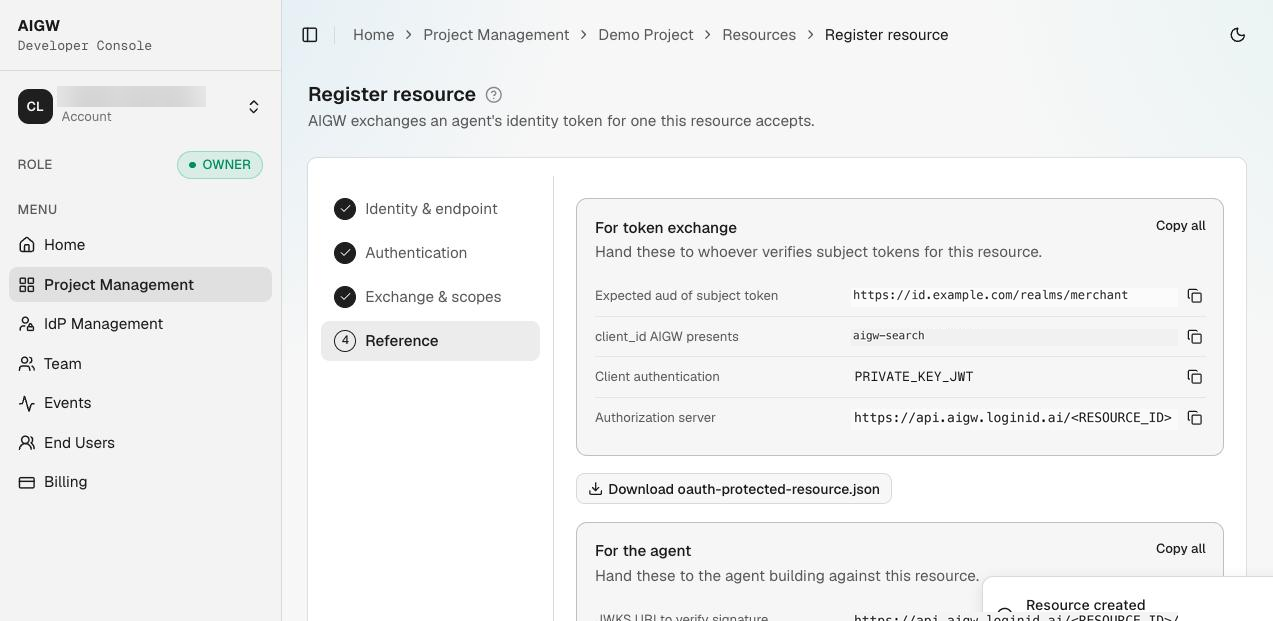
Step 1 — Create a JWT Authorization Grant Identity Provider
In Keycloak go to Identity providers → Add provider → JWT Authorization Grant.
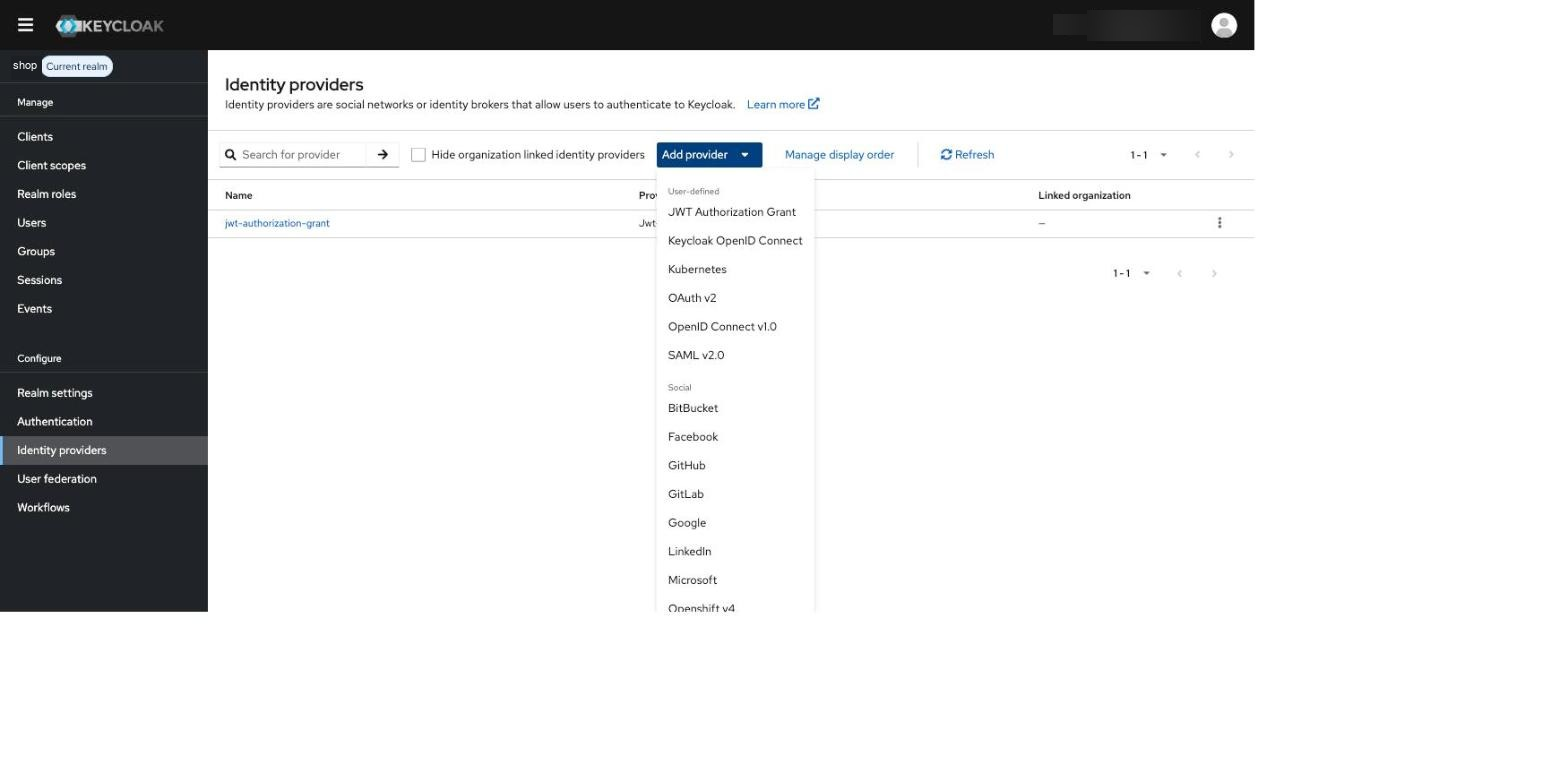
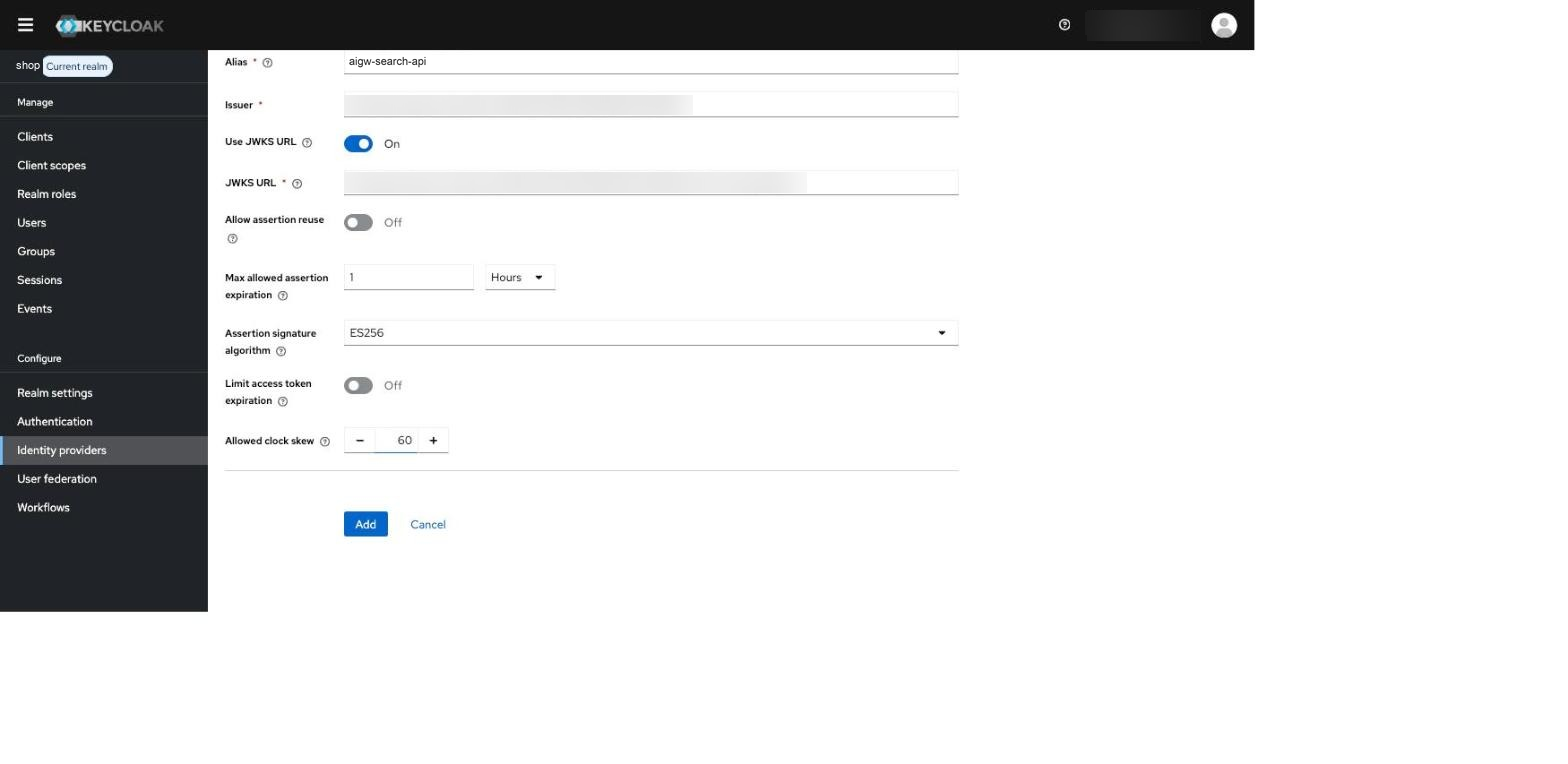
Configure:
| Field | Value |
|---|---|
| Alias | Unique alias for this AIGW Resource, e.g. aigw-search-api |
| Issuer | AIGW per-resource issuer |
| Use JWKS URL | On |
| JWKS URL | AIGW per-resource JWKS URL |
| Max allowed assertion expiration | 1 hour in this example; for assertions with iat, this limits their age when received |
| Assertion signature algorithm | ES256 |
| Allow assertion reuse | Off in the reference setup |
| Allowed clock skew | 60 seconds in the reference setup |
After saving, verify that the provider exists and still points to the intended Resource issuer/JWKS.
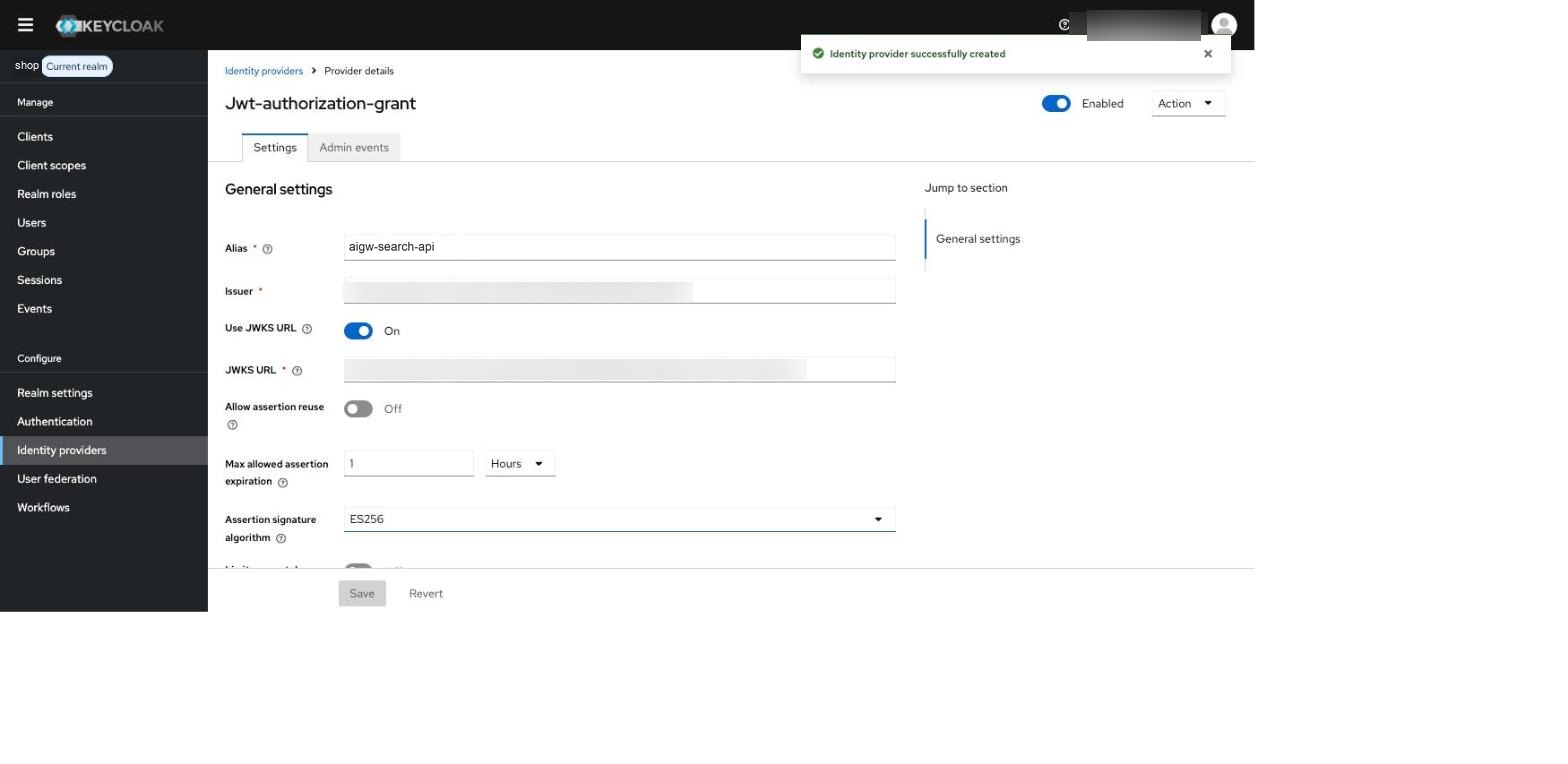
The AIGW issuer is per Resource. A Keycloak JWT Authorization Grant IdP configured for Resource A should not be reused for Resource B with a different issuer.
Step 2 — Create the Keycloak client used by AIGW
Go to Clients → Create client and choose OpenID Connect.
The Client ID must exactly match the Client ID configured on the AIGW Resource.
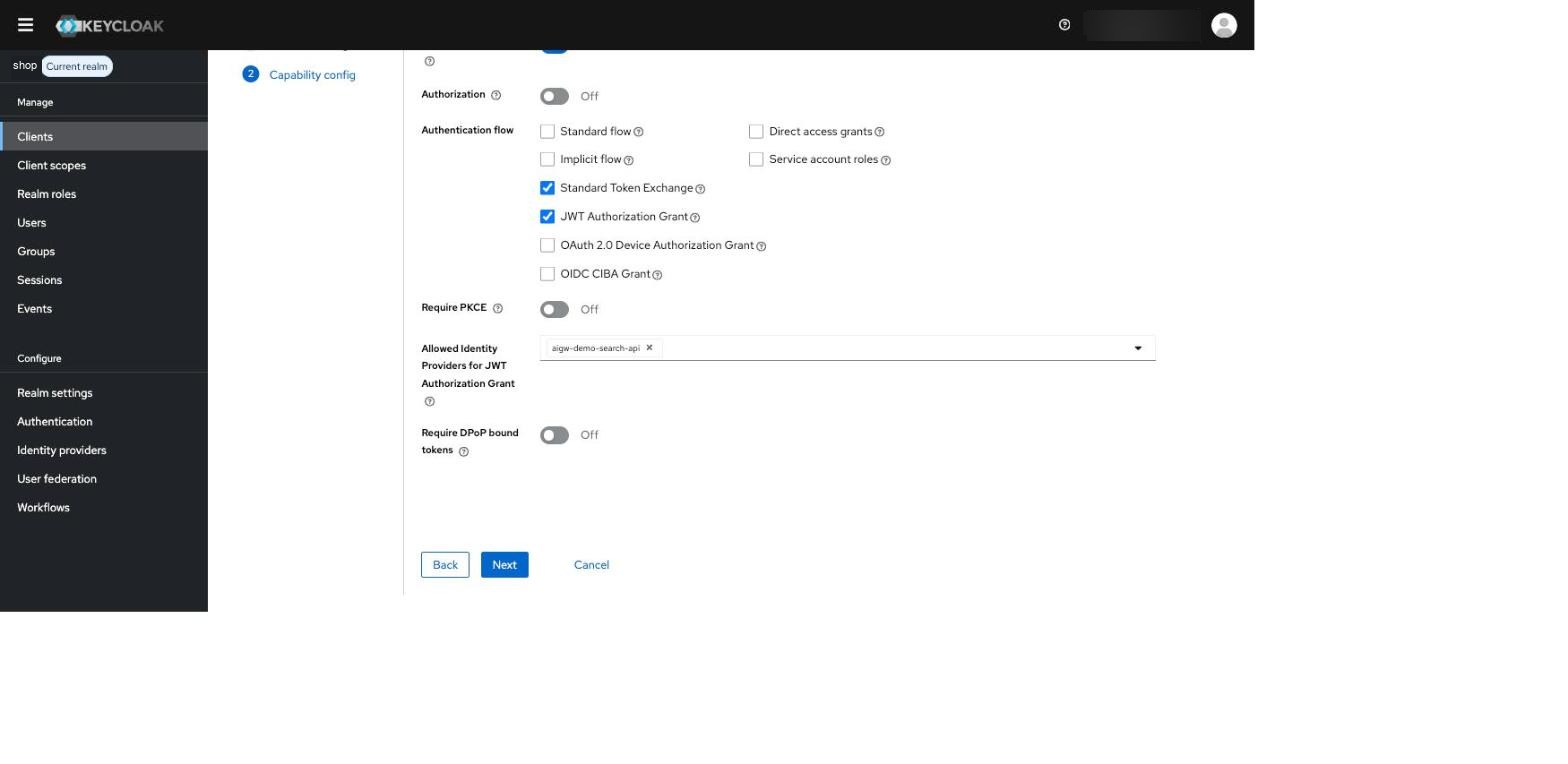
In Capability config:
- Client authentication: On
- Standard flow: Off for this back-channel client
- JWT Authorization Grant: On
- Allowed Identity Providers for JWT Authorization Grant: the IdP alias from step 1
- Use JWT Authorization Grant for this setup; Standard Token Exchange is not required by this request pattern
Step 3 — Configure Signed JWT client authentication
Open the client Credentials tab:
- Client Authenticator: Signed JWT
- Signature algorithm: ES256
- Max expiration: 1 minute; send each newly issued client assertion within that window. AIGW assertions include
iatand expire after 5 minutes by default; Keycloak also checksexp.
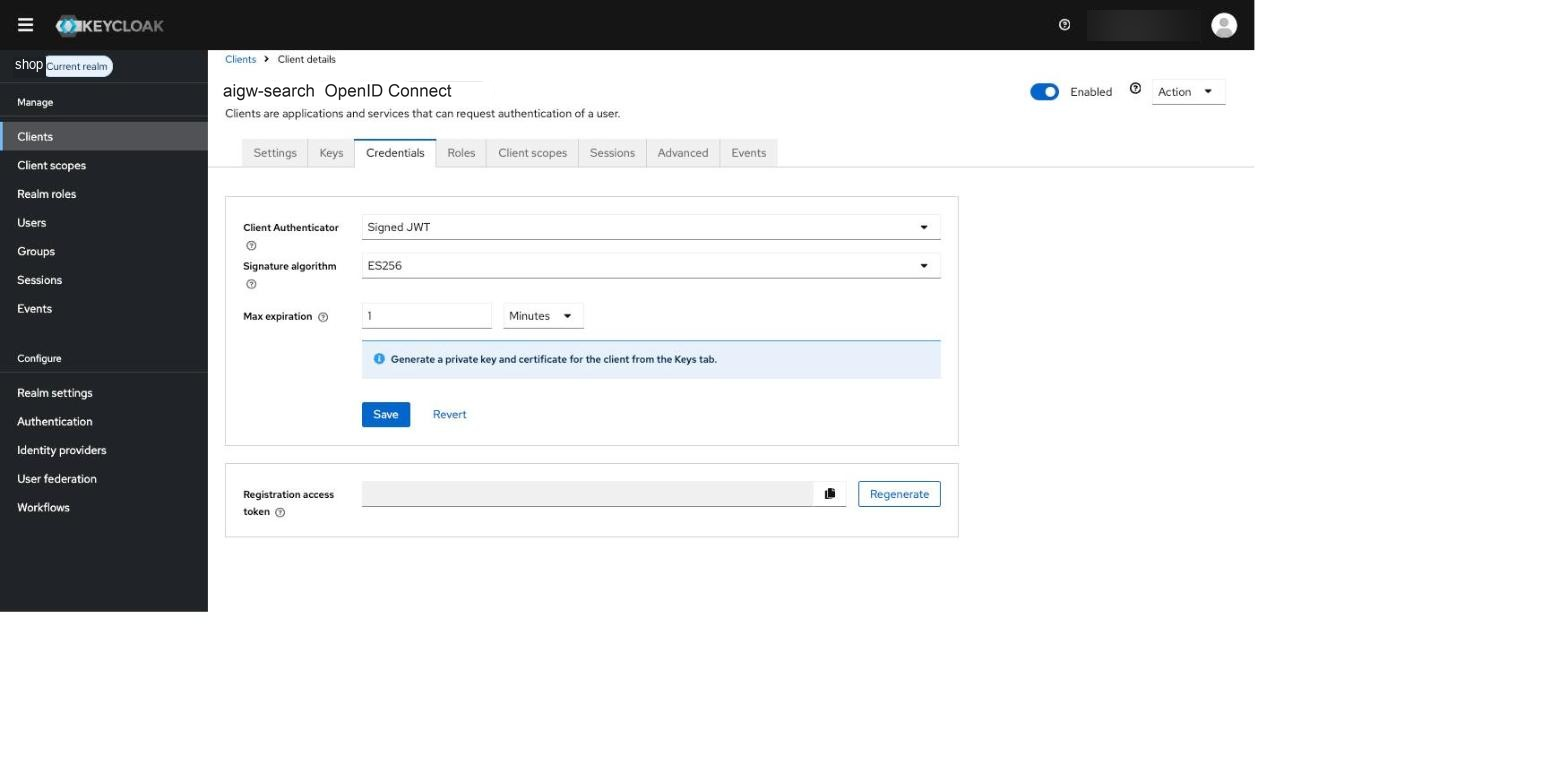
When Keycloak asks Change to client-jwt?, confirm the change. Otherwise the new authenticator is not saved.
Next open Keys:
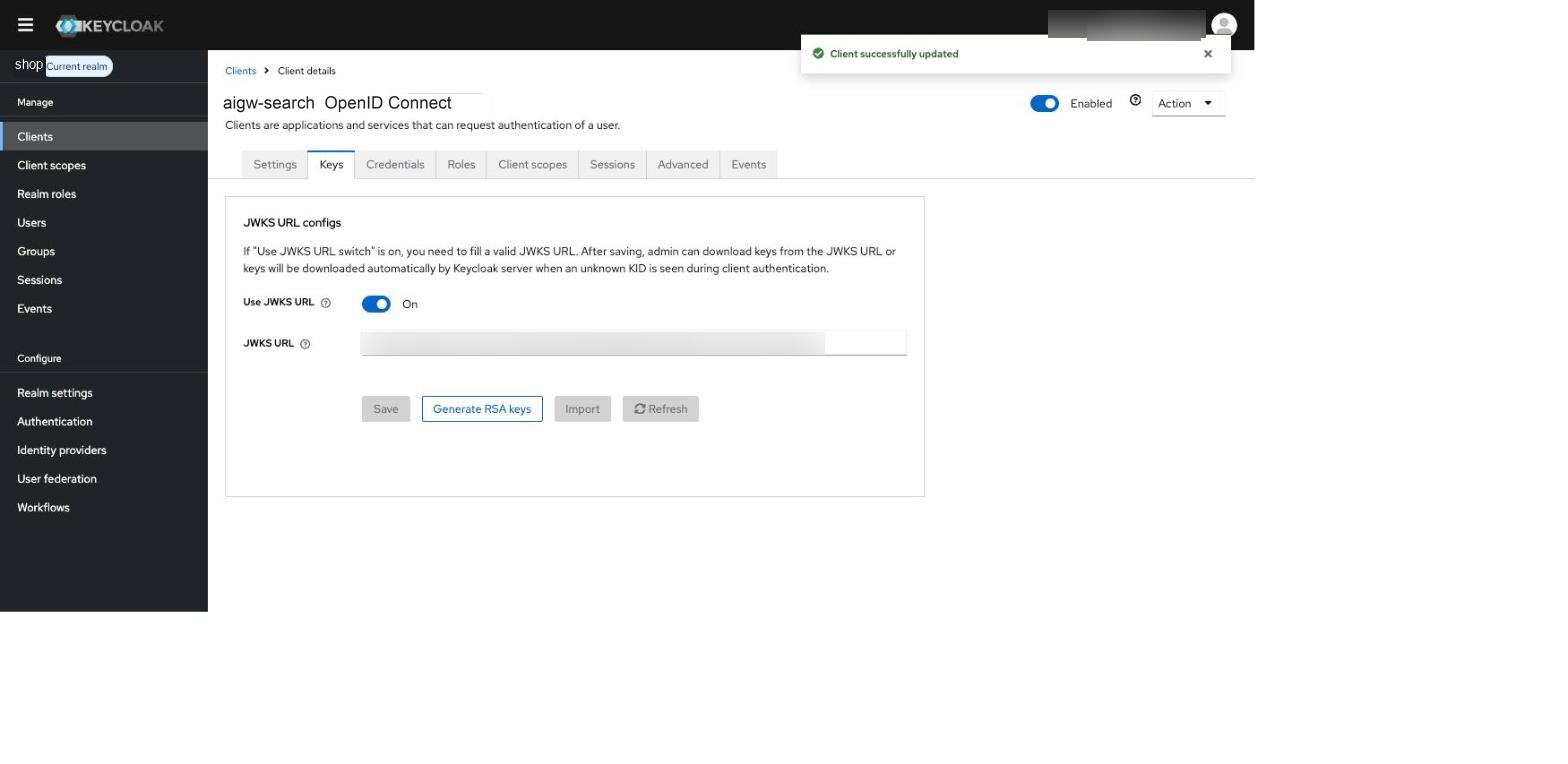
Using a JWKS URL lets Keycloak fetch an updated key when AIGW rotates to a new kid.
Step 4 — Configure the custom audience mapping
AIGW user/client assertions use the AIGW Resource's configured Issuer URL (the merchant AS issuer) as aud.
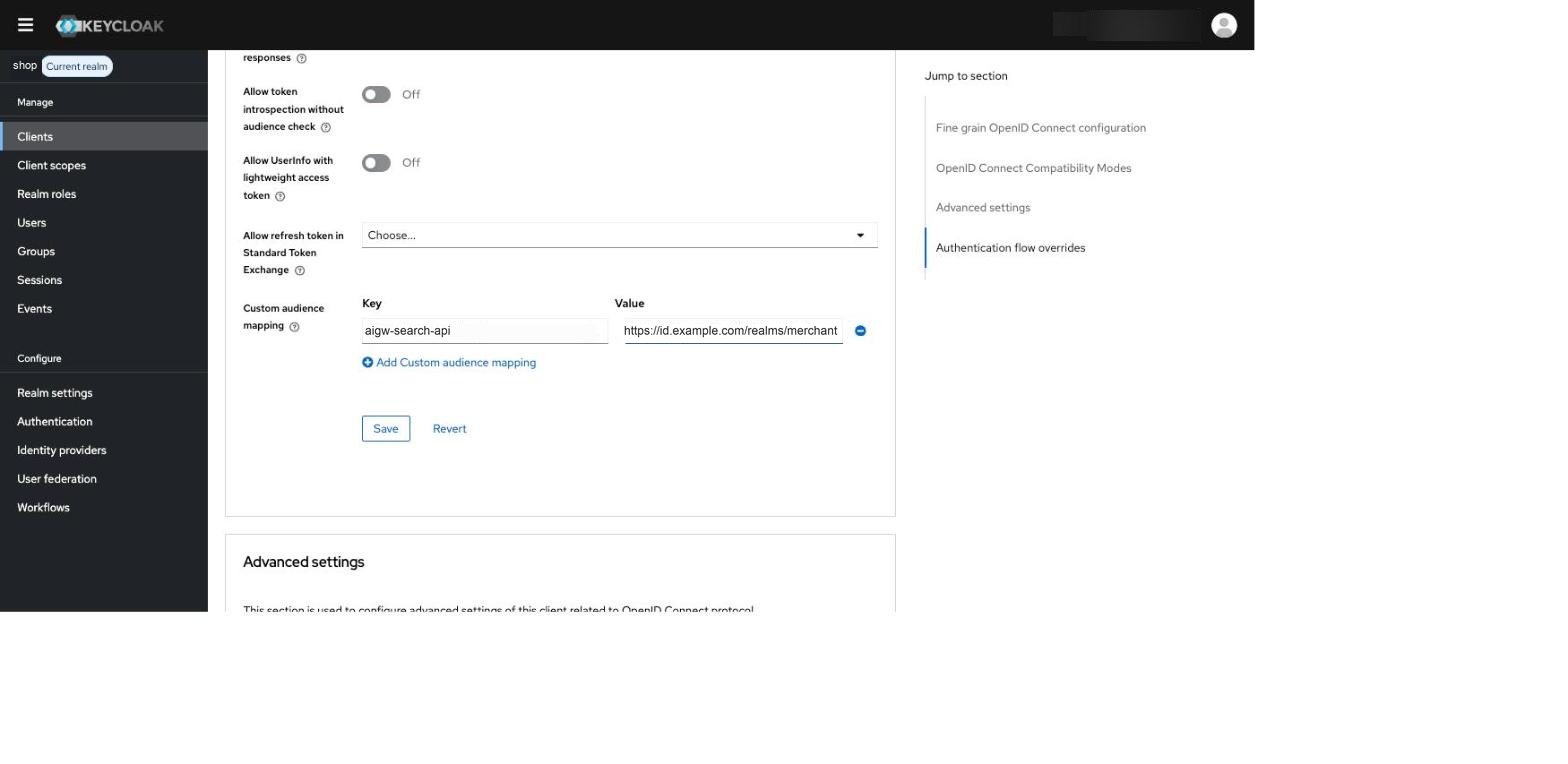
Keycloak accepts its realm issuer or token endpoint as the user-assertion audience. When AIGW's Issuer URL equals the Keycloak realm issuer, no custom audience mapping is needed. If your integration requires a custom accepted audience, open Advanced → OpenID Connect Compatibility Modes → Custom audience mapping and map:
<JWT Authorization Grant IdP alias> -> <Keycloak realm issuer>
Example:
aigw-search-api -> https://id.example.com/realms/merchant
Step 5 — Create and attach merchant scopes
For every AIGW Requested scope, create a Keycloak client scope with the same protocol value.
Example for search:read:
- Name:
search:read - Type: None
- Protocol: OpenID Connect
- Include in token scope: On
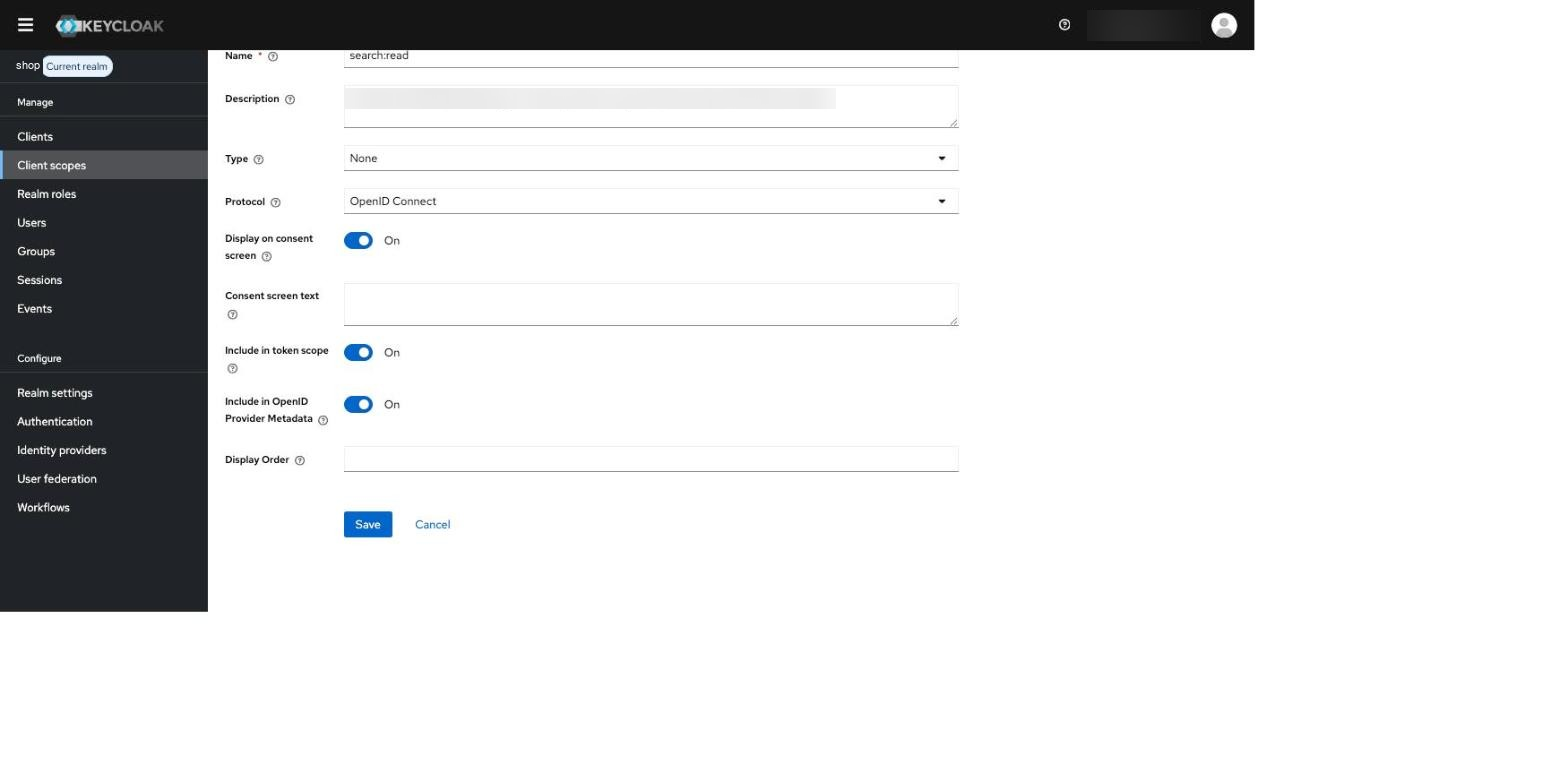
Then open the AIGW client and attach the scope as Optional.
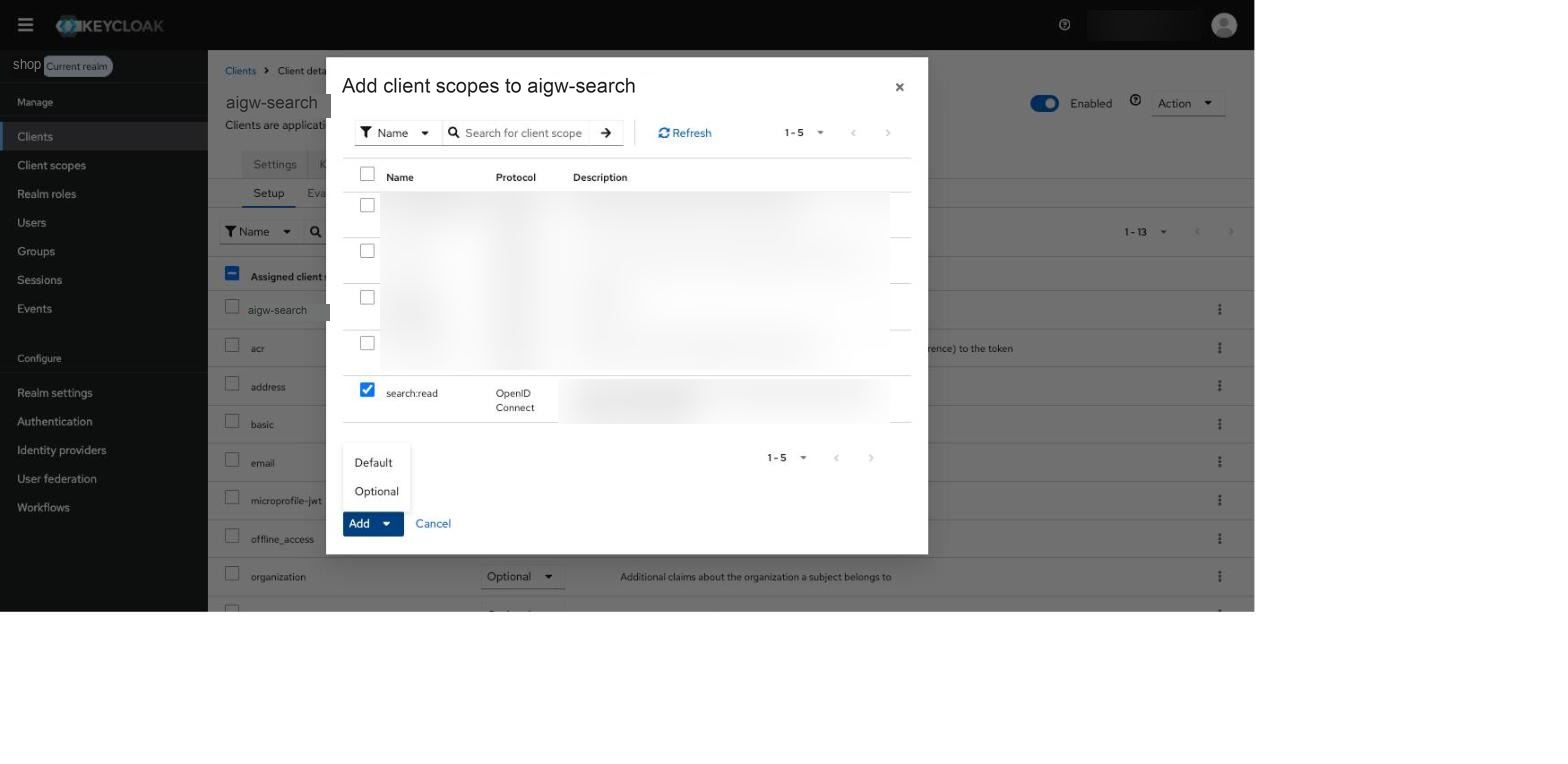
Using Type None avoids assigning the scope as a realm-wide default to unrelated clients.
Step 6 — Point the AIGW Resource to Keycloak
Back in AIGW, open the Token exchange Resource Configuration and set:
Issuer URL     = https://<keycloak>/realms/<realm>
Token endpoint = https://<keycloak>/realms/<realm>/protocol/openid-connect/token
Client ID      = <the Keycloak client created above>
Method         = private_key_jwt
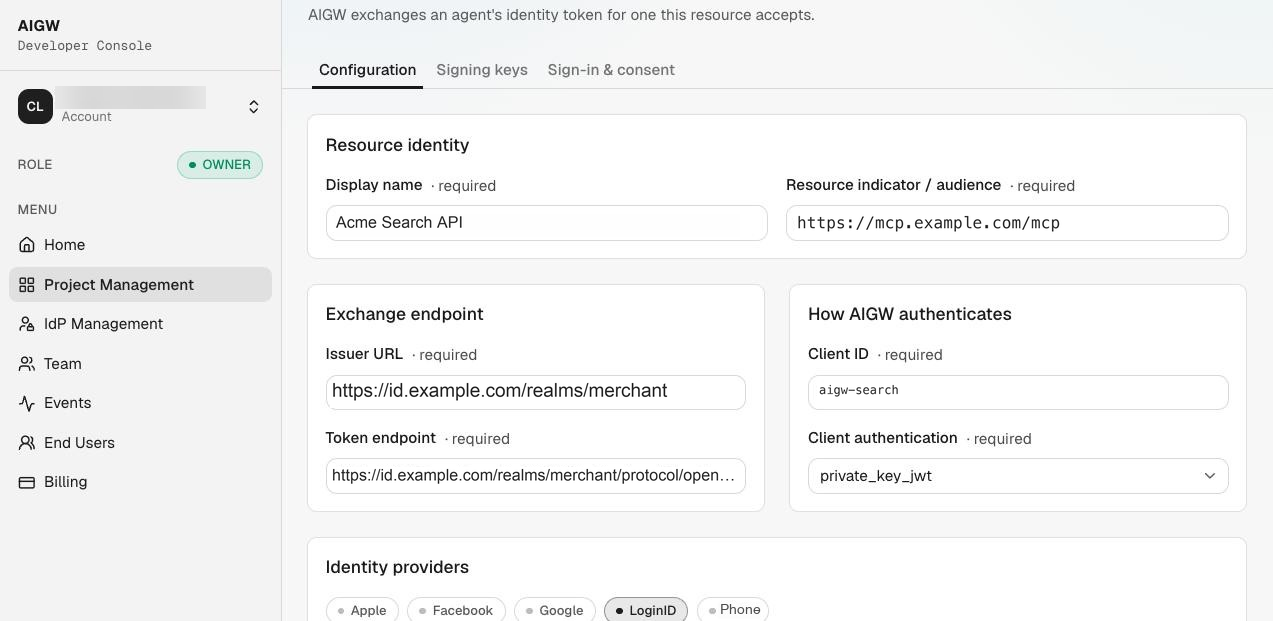
Reload after saving and verify the values persisted.
Step 7 — Define user matching/provisioning
Keycloak resolves the assertion's sub through a federated identity link. Matching the user's Keycloak email field alone does not create that link.
For the first test, use a merchant test user whose identity you have verified. AIGW tries emails returned by the user's sign-in provider before its pairwise subject. Link the exact email supplied by the test user's AIGW sign-in provider as the external user ID; do not guess it from a display name or an unrelated Keycloak username.
- In Keycloak, open Users, select the merchant test user, and copy its internal user ID.
- Copy the JWT Authorization Grant provider's Alias from Step 1, e.g.
aigw-search-api. - From an administrator's terminal, create the link with the Admin REST API. Supply
KEYCLOAK_ADMIN_TOKENfrom your existing administrative session; it needs permission to manage this user.
KEYCLOAK_BASE='https://id.example.com'
REALM='merchant'
KEYCLOAK_USER_ID='your-keycloak-user-id'
IDP_ALIAS='aigw-search-api'
EXTERNAL_USER_ID='developer@example.com'

: "${KEYCLOAK_ADMIN_TOKEN:?Set your Keycloak administrative access token}"
curl --fail-with-body --silent --show-error \
  -X POST \
  -H "Authorization: Bearer $KEYCLOAK_ADMIN_TOKEN" \
  -H 'Content-Type: application/json' \
  --data "$(jq -nc --arg provider "$IDP_ALIAS" --arg external "$EXTERNAL_USER_ID" \
    '{identityProvider:$provider,userId:$external,userName:$external}')" \
  "$KEYCLOAK_BASE/admin/realms/$REALM/users/$KEYCLOAK_USER_ID/federated-identity/$IDP_ALIAS"
Use Bash/Zsh with curl and jq. Replace the example email with the verified external identity. A successful create returns HTTP 204 with no body. If a link already exists (409), read it and confirm its values before changing anything.
Read the link back:
curl --fail-with-body --silent --show-error \
  -H "Authorization: Bearer $KEYCLOAK_ADMIN_TOKEN" \
  "$KEYCLOAK_BASE/admin/realms/$REALM/users/$KEYCLOAK_USER_ID/federated-identity" \
  | jq --arg provider "$IDP_ALIAS" '.[] | select(.identityProvider == $provider)'
Expect identityProvider to match the IdP alias and userId to match the exact asserted external identity. Sign in through AIGW with that test identity, authorize search:read, and redeem the merchant access token.
For subject-based links, obtain the Project's pairwise subject from a validated AIGW identity token or the Account's authorized user view and use it as EXTERNAL_USER_ID. Automatic provisioning requires a separate merchant-owned workflow; the JWT grant does not create users.
See the Keycloak user-link API for permissions and response codes.
Step 8 — Validate the setup
Check each layer separately:
- Keycloak can fetch the AIGW Resource JWKS.
- The Keycloak client uses Signed JWT/ES256.
- The assertion audience matches the realm issuer or the configured custom mapping.
- Every requested AIGW scope exists and is attached.
- The target user can be resolved from the assertion
sub. - AIGW Resource issuer/token endpoint/client ID exactly match Keycloak.
- Assertions have not expired, and their age since
iatis within Keycloak's configured limit.
Keycloak's JWT Authorization Grant does not issue a merchant refresh token. When that access token expires and AIGW returns 410 reauthentication_required, start a new user authorization.
Common Keycloak pitfalls
| Problem | Why it happens | Fix |
|---|---|---|
| IdP alias collision | Add-provider form may prefill jwt-authorization-grant | Use a unique alias per AIGW Resource |
| New scope never appears | Include in token scope defaults Off | Turn it On |
| Scope accidentally assigned widely | Client scope Type set to Default/Optional during creation | Use Type=None, then attach explicitly |
invalid_client | Signed JWT/JWKS/algorithm/lifetime mismatch | Recheck client credentials + keys |
invalid_grant / user not found | No user mapping/link for assertion sub | Configure mapping/provisioning |
| JWT rejected for audience | Issuer URL or custom mapping differs from assertion aud | Match the exact realm issuer; configure a custom mapping only when required |
| Key rotation fails | Keycloak has static key instead of JWKS URL | Configure the Resource JWKS URL |